

Passkey flow
A typical passkey flow is composed of 4 main steps, depicted below: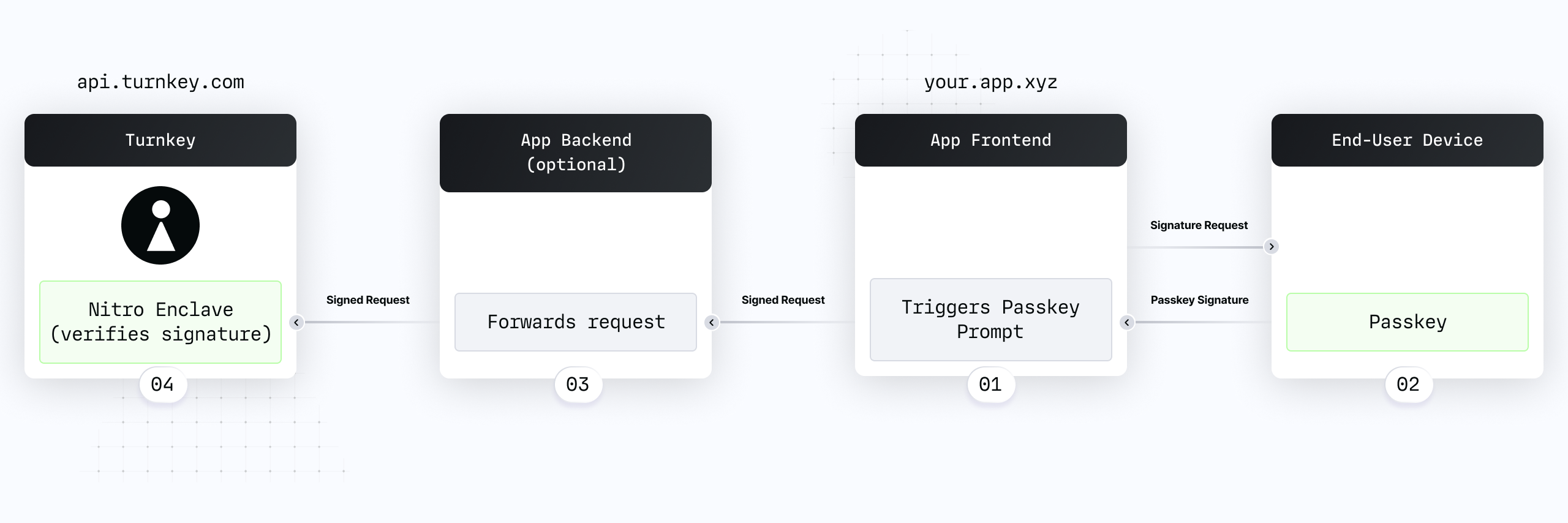
- Your app frontend triggers a passkey prompt.
- Your end-user uses their device to produce a signature with their passkey, and a signed request is produced.
- The signed request is forwarded to your backend. This step is optional, see “To Proxy or not to proxy” below for more information.
- The signed request is verified within a Turnkey secure enclave.
- Passkey registration uses
navigator.credentials.create(as described in this guide).navigator.credentials.createtriggers the creation of a new passkey. - Passkey authentication uses
navigator.credentials.get. See this guide for more information.navigator.credentials.gettriggers a signature prompt for an existing passkey.
Our SDK can help
Our SDK has integrated passkey functionality, and we’ve built examples to help you get started.-
@turnkey/httphas a helper to trigger passkey registration (getWebAuthnAttestation). You can see it in action in ourwith-federated-passkeysexample: direct code link -
@turnkey/webauthn-stamperis a passkey-compatible stamper which integrates seamlessly withTurnkeyClient:
@turnkey/viemis a package wrapping all of the above so that you work directly with Viem without worrying about passkeys. See this demo.
- Create an issue on our SDK repo
- Join our slack community here
- Contact us at hello@turnkey.com